How RFID access control works and what to check before upgrading
a[data-rs-seo-link]{text-decoration:underline!important;color:#1a56db!important;cursor:pointer!important;}a[data-rs-seo-link]{text-decoration:underline!important;color:#1a56db!important;cursor:pointer!important;}
What RFID access control does
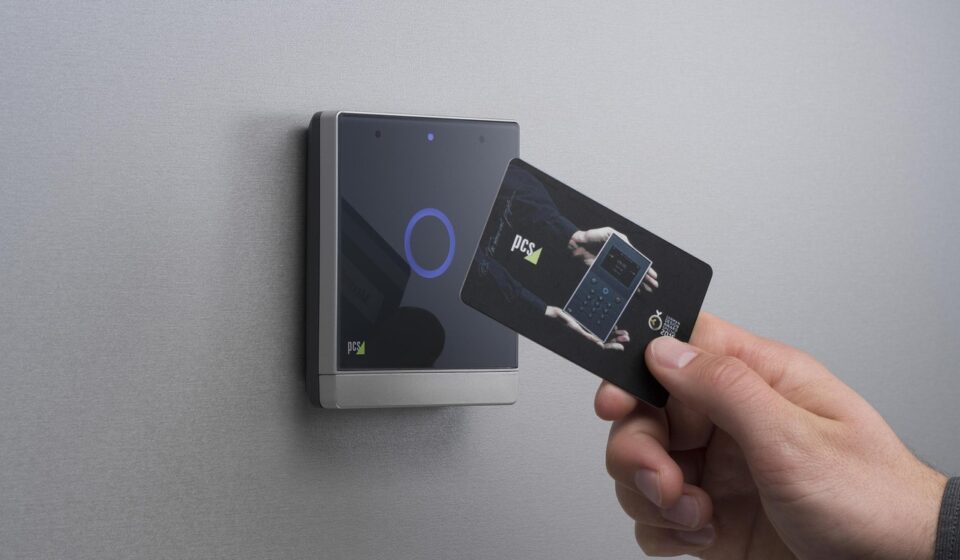
RFID access control uses radio-frequency credentials, readers, controllers and door hardware to decide who can enter a protected area. In a typical door transaction, a user presents a card, fob, sticker, wristband or mobile credential. The reader captures the credential data, the controller checks permissions, and the door unlocks only when the credential, schedule and access rule match.
The security design is more involved than the badge tap. A reliable RFID access control system depends on three linked layers: the credential technology, the reader-to-controller communication method and the management process for issuing, revoking and auditing access. For that reason, an upgrade should not be judged only by read range or card price. It should also review cloning resistance, OSDP Secure Channel support, access logs, network segmentation and how quickly lost badges or terminated credentials can be disabled.
For broader context on door security systems, see Costcola’s Access Control section.
How a badge tap becomes an access decision
An RFID door transaction may take only seconds, but several components are involved. The credential contains an identifier, an application or a secure key structure. The reader energizes the credential field, reads the approved data and sends a message to the access control panel or controller. The controller then compares that message with local or server-based rules, including the cardholder record, door group, time schedule, holiday schedule and anti-passback logic if configured. If the request is valid, the controller triggers the electric strike, magnetic lock or other release device and records the event.
Systems differ in where the access decision is made. In many commercial deployments, the controller can continue making local decisions even if the management server is temporarily offline. Cloud-managed systems may synchronize credential permissions to local controllers, while enterprise systems may integrate with identity management, visitor management, video surveillance and HR workflows. In every case, the RFID credential is only one part of the security chain. A secure card used with weak reader wiring, poor account administration or an exposed controller can still leave a site vulnerable.
The RFID technologies used in access control
RFID is not a single technology. Public references from organizations such as GS1 and IEEE describe common RFID bands, including low frequency, high frequency and ultra-high frequency. In access control, low-frequency proximity cards and high-frequency smart cards are most common for people doors. UHF credentials are used more often for longer-range vehicle gates, parking and hands-free identification.
| Technology | Typical frequency | Common access use | Security considerations |
|---|---|---|---|
| Low-frequency proximity | 125 kHz or 134 kHz | Legacy cards and fobs for office, apartment and basic door entry | Often based on static identifiers, so it may be easier to copy or emulate than encrypted smart credentials. |
| High-frequency smart card | 13.56 MHz | Corporate, campus, healthcare and government-style credentials | Can support stronger cryptographic features, but security depends on the specific card family, keys and configuration. |
| Ultra-high frequency | Commonly 860–960 MHz, depending on region | Parking, vehicle entry and longer-range identification | Longer read range can improve convenience but must be controlled to reduce unwanted reads and tailgating risk. |
The important distinction is not frequency alone. A 13.56 MHz card is not automatically secure, and an RFID label that presents a simple serial number is not equivalent to a smart credential using mutual authentication. When evaluating a system, ask what data the reader accepts, whether the credential relies on a static number and how keys are generated, stored and rotated.
Security issues that matter more than read range
Static identifiers and cloning risk
MITRE’s CAPEC-399 attack pattern describes cloning RFID cards or chips as a known attack scenario in which duplicated identifiers can be reused. In practical terms, credentials that simply broadcast a fixed number are much weaker than credentials that require cryptographic verification. The Security Industry Association’s 2026 Corporate Credential Design Guide also warns against relying solely on static identifiers, such as UID-only reads or facility code and card number, for medium- or high-security access control applications.
This does not mean every low-risk interior door needs the same credential as a regulated facility. It means the credential choice should follow the risk. A supply closet, coworking lounge, lab, data room and perimeter employee entrance do not create the same consequences if access is abused. Assigning a security level to each door helps avoid both overbuying and underprotecting.
Reader-to-panel communication
Many older access control systems use Wiegand wiring between the reader and the panel. Wiegand is widely installed and can be reliable, but it was not designed for the cybersecurity expectations placed on current systems. Its limitations include one-way communication and a lack of built-in encryption or active supervision. If an attacker can reach reader wiring, a weak reader-to-panel link can become a practical attack surface, even when the card itself appears modern.
OSDP, the Open Supervised Device Protocol maintained by the Security Industry Association, was created as a more capable alternative for communication between access control panels and peripheral devices such as card readers. SIA describes OSDP as supporting bidirectional communication, device supervision and Secure Channel encryption. IEC published OSDP as IEC 60839-11-5:2020, and SIA identified OSDP Version 2.2.2, released in October 2024, as the current version in its public materials as of September 2026.
Credential lifecycle management
Credential security also depends on administration. A strong badge is still a risk if it remains active after an employee leaves, is shared between users or is never reviewed. NIST guidance for PIV and derived PIV credentials emphasizes validation, revocation and invalidation when credentials are lost, compromised or tied to a terminated identity account. Most commercial RFID systems are not federal PIV systems, but the same principle applies: access should follow the person’s current role, and removal should happen quickly when that role changes.
Wiegand and OSDP in an RFID access control upgrade
An RFID access control upgrade often comes down to whether the site should keep legacy Wiegand infrastructure, move to OSDP or use a staged approach. The right path depends on door count, cable condition, panel compatibility, risk level, maintenance skills and budget. For new higher-security doors, however, it is difficult to justify installing a reader-to-panel path that cannot be encrypted or supervised when OSDP-capable options are available. See also: Alarm and Detection.
| Area | Legacy Wiegand approach | OSDP approach |
|---|---|---|
| Communication | Generally one-way from reader to controller | Bidirectional communication between controller and reader |
| Security | No native encrypted channel | Can use Secure Channel with AES-128 encryption when properly enabled and commissioned |
| Monitoring | Limited supervision of reader status | Supports device supervision and richer status information |
| Wiring | Common in older sites and familiar to installers | Typically uses RS-485 style two-wire communication and may support multidrop designs where appropriate |
| Migration concern | Easy to leave in place but may preserve known weaknesses | Requires compatible readers, panels, configuration and verification that Secure Channel is active |
A common mistake is assuming that OSDP automatically fixes every credential problem. OSDP Secure Channel protects the reader-to-panel communication path; it does not by itself make a weak static card resistant to copying. A balanced upgrade pairs secure credentials with secure reader communication and disciplined system administration.
How to choose RFID access control for different doors
Start with the door’s function rather than the product catalog. A main employee entrance may need fast throughput, visitor support and video correlation. A server room may need multi-factor authentication, stricter schedules and more frequent review. A parking gate may need longer read range, vehicle tags and anti-passback logic. A shared amenity door may prioritize easy credential replacement and tenant turnover.
- Define the threat level. Separate low-risk convenience doors from perimeter, regulated, cash-handling, data, pharmacy, lab or critical infrastructure areas.
- Select credential strength by risk. Avoid static identifier-only credentials where cloning would create material harm. For higher-risk areas, evaluate smart credentials with cryptographic authentication.
- Specify reader communication. For new deployments, require OSDP support and confirm whether Secure Channel can be enabled, commissioned and audited.
- Check panel compatibility. Readers, panels and management software must support the same credential formats, OSDP features and event handling.
- Plan for lost badges. The system should make revocation fast, traceable and available to authorized administrators.
- Protect the controller network. Controllers and servers should not sit unprotected on a flat business network. General CISA and NIST guidance for cyber-physical and operational technology environments supports segmentation, logging and controlled remote access.
- Think about people flow. Security that causes constant delays may be bypassed. Match read range, mounting height, lighting, signage and door hardware to real user behavior.
A practical migration and maintenance checklist
For existing buildings, a staged migration is often safer than a rushed rip-and-replace. Begin with an inventory of readers, panels, credentials, door hardware, cable routes, software versions and active cardholder records. Identify which doors use Wiegand, which credentials are legacy proximity cards and which panels can support OSDP or secure smart-card formats. Then rank doors by risk and replacement urgency.
- Document the current state. Record reader model, panel model, card format, firmware, cable condition and door function.
- Remove inactive records. Before adding technology, clean up terminated users, duplicate credentials and shared accounts.
- Pilot secure credentials. Test a small group of users, readers and doors before mass card issuance.
- Commission OSDP carefully. Confirm addressing, baud rate, panel support and Secure Channel status rather than assuming encryption is active.
- Validate event logs. Check that granted access, denied access, forced door, held door and reader tamper events appear correctly.
- Train administrators. Security depends on who can issue credentials, change door groups, export logs and override schedules.
- Review access periodically. Align cardholder privileges with HR status, contractor end dates and department ownership of controlled spaces.
Maintenance should include firmware review, access control database backups, periodic tests of emergency egress and lockdown behavior, and clear procedures for lost cards. If the system integrates with video, alarms or building automation, test those workflows after major changes instead of waiting for an incident.
Frequently asked questions
Is RFID access control secure?
It can be secure when the credential, reader, controller, software and operating process are designed together. Encrypted smart credentials, OSDP Secure Channel, timely revocation, network segmentation and sound audit practices all improve security. A basic static card on an old unsupervised reader connection is much weaker.
Can RFID access cards be copied?
Some can. Cards that rely on static identifiers are more exposed to copying or emulation. Cryptographic smart credentials are harder to duplicate, but their actual protection depends on correct key management, reader configuration and system design.
Do I need OSDP if I already use smart cards?
Smart cards and OSDP protect different parts of the system. A smart card can strengthen the credential transaction, while OSDP Secure Channel can protect data between the reader and controller. For higher-risk doors, both layers should be considered.
Is mobile access the same as RFID access control?
Mobile credentials may use NFC, Bluetooth or other methods depending on the platform. They can deliver a similar access experience, but they introduce additional questions about phone enrollment, device loss, app security, identity proofing and revocation.
What is the most important upgrade priority?
For many existing sites, the first priority is identifying where legacy proximity credentials and Wiegand reader connections are still used on important doors. From there, focus on high-risk entrances first, confirm compatibility and migrate in a way that preserves operations while reducing credential and communication risks.