Access control for modern security systems and facilities

a[data-rs-seo-link]{text-decoration:underline!important;color:#1a56db!important;cursor:pointer!important;}a[data-rs-seo-link]{text-decoration:underline!important;color:#1a56db!important;cursor:pointer!important;}
What access control means in security
Access control is the process of deciding who or what may enter a place, use a system, open an application, handle data, or operate equipment, and then enforcing that decision consistently. In modern security, it is not a single device or software feature. It is a coordinated set of policies, identities, credentials, readers, locks, workflows, logs, and review processes. A strong access control program reduces risk by limiting privileges, confirming identity, recording activity, and making it possible to remove access quickly when roles change. For more coverage of this topic, visit the Access Control section.
Most readers approaching access control need practical answers: what is being protected, how identity is verified, which permission model fits the risk, and what should be reviewed before a system is selected or upgraded. The answer depends on context. A warehouse door, a server room, a cloud dashboard, and a visitor management process all require different controls, but they should follow the same principle: give the right access to the right entity for the right reason, at the right time.
The main components of an access control program
Effective access control starts before a card, PIN, phone credential, password, biometric factor, or token is issued. The organization first needs to know which people, services, devices, doors, applications, and spaces are in scope. That inventory should include employees, contractors, visitors, administrators, vendors, service accounts, shared devices, restricted rooms, and critical systems. Without that baseline, access decisions become inconsistent and revocation is often delayed.
Identity enrollment and credential lifecycle
Every access decision depends on the quality of the underlying identity record. For physical security, this may mean confirming an employee record before issuing a badge or approving a contractor for a temporary credential. For digital systems, it may involve account creation, identity proofing, multi-factor authentication, and device registration. The credential lifecycle should cover issuance, activation, replacement, suspension, expiration, and destruction or return. Lost badges, orphaned accounts, duplicate identities, and credentials that remain active after termination are common weaknesses because they create access paths that no longer match business need.
Authentication and authorization
Authentication asks whether the person, device, or service is who it claims to be. Authorization asks what that authenticated entity is allowed to do. A badge may authenticate a user at a door, but authorization determines whether that badge opens the front lobby, a laboratory, a cash room, or an electrical closet. In software, a password and second factor may authenticate a user, while role and policy rules determine whether the user can read records, approve payments, change configuration, or export data.
Separating these two ideas is important. Strong authentication does not correct excessive authorization. A highly secure credential can still create risk if it opens too many doors or gives broad administrative privileges. That is why least privilege, separation of duties, and periodic access review remain essential parts of access control governance.
Enforcement points and audit trails
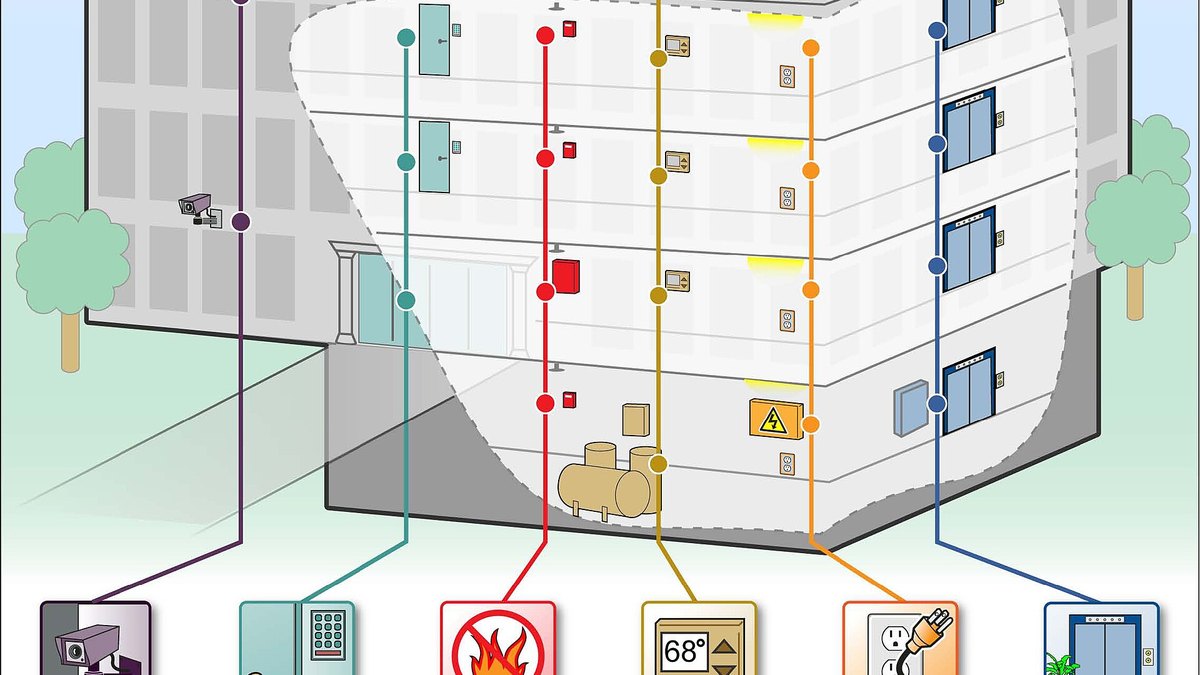
Access control is enforced at specific points: door controllers, smart locks, turnstiles, elevators, network gateways, identity providers, application permissions, database roles, and administrative consoles. Each enforcement point should produce useful event records. Those records are valuable only if they can be searched, protected from tampering, retained for an appropriate period, and reviewed when incidents or anomalies occur.
Physical and digital access control should be planned together
Physical and digital security teams often manage separate systems, but the risks overlap. A person who enters a restricted operations room may gain access to network ports, controllers, files, or equipment. A compromised administrator account may change physical access permissions if the access control platform is managed through a connected application. A visitor who is properly escorted in the lobby may still create risk if temporary digital access is not removed after the visit.
NIST Cybersecurity Framework 2.0 places identity management, authentication, and access control together under the Protect function. Its framing is useful because it treats access to physical and logical assets as related risk decisions rather than separate checklists. In practice, a mature program should coordinate HR records, physical security badges, identity and access management, device inventory, incident response, and compliance review.
| Layer | Typical access decision | Key review question |
|---|---|---|
| Facility perimeter | Who may enter the building or site? | Are visitors, deliveries, employees, and contractors handled differently? |
| Restricted area | Who may enter high-risk rooms or zones? | Are permissions based on current job need and reviewed after role changes? |
| Systems and applications | Who may view, change, approve, or export information? | Are privileges limited and logged at the function level? |
| Administrative control | Who may create users, change policies, or override alarms? | Are admin actions separated, monitored, and approved? |
Access control models and where they fit
Access control models describe how permissions are assigned and enforced. Many organizations use more than one model because buildings, applications, and data systems do not all have the same risk profile.
Discretionary access control
Discretionary access control allows an owner or authorized user to decide who else can access a resource. It is flexible and familiar in file sharing and collaboration environments, but it can become difficult to govern when many people can grant access independently. It works best when the risk is moderate, the ownership model is clear, and activity is logged.
Role-based access control
Role-based access control assigns permissions to roles rather than to each person individually. A shipping associate, finance manager, security officer, or facilities technician can receive a standard set of permissions tied to job duties. This model is easier to manage at scale, but roles must be kept current. Role creep occurs when employees move between positions and accumulate permissions from old roles.
Attribute-based and context-based access control
Attribute-based access control uses characteristics such as department, location, time, device status, employment type, clearance level, or transaction risk. A system might allow access only during a scheduled shift, only from a managed device, or only when the user is on site. This approach can support more precise decisions, but it requires reliable data and careful policy design. If attributes are inaccurate, access decisions will also be inaccurate.
Zero trust as an access control strategy
Zero trust is often discussed as a cybersecurity architecture, but its access control message is broader: do not rely on network location or past trust alone. NIST Special Publication 800-207 describes zero trust architecture as an approach with deployment models and use cases that can improve enterprise security posture. For access control teams, the practical lesson is to make decisions based on identity, device, policy, context, and risk, and to re-evaluate access continuously where the risk justifies it. See also: Alarm and Detection.
Standards and technology choices that influence access control
Standards do not choose a product for an organization, but they help define what good access control should consider. NIST SP 800-53 Revision 5 includes an Access Control control family, often referenced by organizations that need a structured way to document policies, account management, least privilege, session controls, and related safeguards. NIST CSF 2.0 also highlights managed identities and credentials, authentication, policy-defined authorization, review of permissions, and risk-based physical access.
For physical access systems, communication between readers and controllers is a practical design issue. The Security Industry Association maintains the Open Supervised Device Protocol, commonly known as OSDP, as an open communications standard for access-control panels and peripheral devices such as card readers. SIA materials describe capabilities such as bidirectional communication, device supervision, Secure Channel encryption, smart-card support, and biometric-reader support in OSDP Version 2. The key implementation point is that security features must be configured and verified; buying equipment that supports a secure protocol is not the same as operating it securely.
CISA guidance for critical infrastructure and control-system environments also emphasizes controlling facility entry, managing physical access devices, and reviewing access against risk. That perspective matters because access control failure is not always a cyber event or a forced-door event. It can be a process gap, such as failing to inventory badges, leaving a contractor credential active, or allowing access to control equipment without monitoring.
How to evaluate an access control upgrade
An access control upgrade should begin with risk and workflow, not with a feature list. Different environments may prioritize life safety, auditability, convenience, regulatory alignment, integration, or resilience. A school, clinic, data center, factory, office tower, and retail back room will not all need the same design.
- Define the assets and areas that need protection, including doors, rooms, systems, equipment, records, and administrative consoles.
- Document who needs access, why they need it, when they need it, and who approves changes.
- Review the joiner, mover, and leaver process so access is granted quickly but removed immediately when roles end or change.
- Check credential strength, including how badges, mobile credentials, PINs, passwords, tokens, and biometric factors are issued and revoked.
- Evaluate whether reader-to-controller communication, cloud management, APIs, and integrations are protected appropriately.
- Plan for power loss, network outages, emergency egress, fire and life safety requirements, and local code review by the authority having jurisdiction.
- Require useful logs and reporting so failed attempts, forced doors, held doors, admin changes, and unusual access patterns can be investigated.
- Schedule recurring access reviews for high-risk areas, privileged accounts, contractors, and shared roles.
Common failure points to look for
The most common weaknesses are rarely dramatic. They include dormant badges, shared administrator accounts, excessive door groups, propped doors, weak visitor processes, unmanaged service accounts, unreviewed contractor access, and integrations that allow one system to change permissions in another without enough oversight. These issues are manageable when ownership is clear and review is routine.
Questions to ask before selecting technology
- Does the system support the access policies the organization actually needs, or will staff create manual workarounds?
- Can permissions be reviewed by role, location, risk level, and individual user?
- How are emergency overrides, lockdowns, and after-hours exceptions logged and approved?
- Does the system integrate with HR, identity management, video, visitor management, and incident response tools without creating unnecessary exposure?
- Can the organization export logs and configuration data for audit, investigation, and continuity planning?
Frequently asked questions
What is access control in simple terms?
Access control means allowing approved people, devices, services, or processes to reach approved places, systems, or data while blocking everything else. It combines identity, authentication, authorization, enforcement, logging, and review.
What is the difference between authentication and authorization?
Authentication verifies identity. Authorization defines what that verified identity is allowed to do. A user can be authenticated successfully and still be denied access if the requested door, application, file, or function is outside that user’s approved permissions.
Which access control model is best?
No single model is best for every environment. Role-based access control is practical for many organizations because it maps permissions to job duties. Attribute-based and context-based models can provide more precision. Higher-risk environments may require stricter policies, stronger authentication, and more frequent review.
Is biometric access control more secure?
Biometric verification can strengthen identity binding, but it is not automatically better in every case. Security teams should evaluate accuracy, fallback procedures, privacy impact, retention rules, enrollment quality, and how biometric templates are protected. Biometric systems still need sound authorization rules and audit trails.
How often should access rights be reviewed?
Access rights should be reviewed whenever a person joins, changes roles, changes employment status, or no longer needs access. Scheduled reviews should also be based on risk. High-risk rooms, privileged accounts, contractor access, and administrative roles normally justify more frequent review than low-risk general access.